Whether you're designing a logo for your new side hustle or just trying to figure out why your digital photo looks "off" when printed, understanding the difference between RGB and CMYK is the secret sauce to professional-looking visuals.
The simplest way to remember it? RGB is for screens; CMYK is for paper.
RGB: The Language of Light
RGB stands for Red, Green, and Blue. This is an additive colour model.
Think of a dark room: if you shine a red light, a green light, and a blue light onto a wall, the colours "add" together. When all three overlap at full intensity, they create pure white light. Because screens emit light, they use these three colours to create every shade you see on your smartphone, laptop, or TV.
CMYK: The Language of Ink
CMYK stands for Cyan, Magenta, Yellow, and Key (Black). This is a subtractive colour model.
When you print on a white piece of paper, the ink "subtracts" the brightness from the white background. If you mix all the colours together, you get a dark, muddy brown—which is why "Key" (black ink) is added to give the image depth and true darkness.
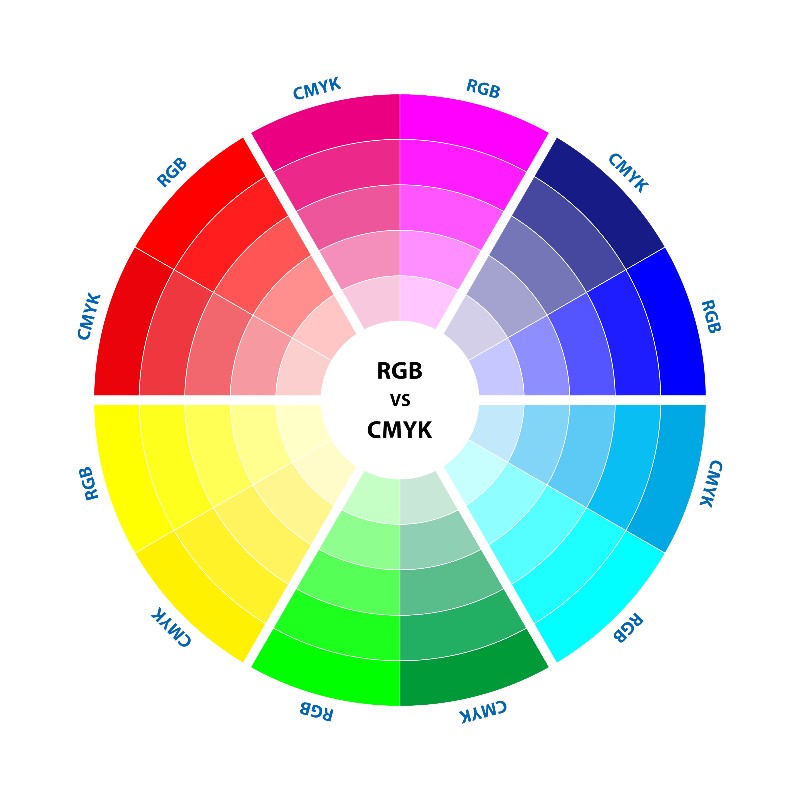
RBG vs CMYK Colour palette diagram
The Quick Comparison
| Feature | RGB | CMYK |
| Full Form | Red, Green, Blue | Cyan, Magenta, Yellow, Key (Black) |
| Medium | Digital Screens | Printed Materials |
| Colour Process | Additive (Adding Light) | Subtractive (Masking Light) |
| Result of Mixing All | White | Black/Dark Brown |
| File Formats | .jpg, .png, .gif | .pdf, .ai, .eps |
Pro Tip: Avoid the "Dull Print" Surprise
The most common mistake designers make is creating a project in an RGB workspace and sending it straight to a printer. The printer will automatically convert it to CMYK, often resulting in colours that look washed out or different than intended.
The Golden Rule: Always start your project in the colour mode of your final destination. If it’s for Instagram, stay in RGB. If it’s for a booklet, switch to CMYK before you even draw the first line.
